If you’re a pastor or church leader, this statistic might sting a little:
80% of first-time church visitors never come back.
Not because your preaching isn’t good. Not because your worship isn’t engaging. Not because your kids ministry isn’t excellent. They don’t come back because of something much simpler—and much more fixable.
They never felt noticed.
And in 2026, the tool that makes the biggest difference in helping visitors feel noticed isn’t your welcome team or your bulletin.
It’s your church website. Let me explain.
The Sunday Morning Reality: What First-Time Visitors Experience
Imagine you’re a young mom who hasn’t been to church in years.
Sunday morning, you wake up nervous. You search “church near me” on your phone. You find a church that looks promising. You decide to visit.
You walk in. You don’t know anyone. You sit in the back. Your kids go to the children’s area—you hope it’s safe.
The service is good. The message resonates. People seem friendly.
But after the service? You slip out. Maybe you shake the pastor’s hand at the door. Maybe you don’t.
You go home.
Monday comes. Tuesday. Wednesday.
No email. No text. No call. Nothing.
By the time next Sunday rolls around, you’re sitting at the breakfast table thinking: “Should we go back to that church? Or should we just stay home and watch Netflix?”
There’s no pull. No connection. No reason to choose church over the couch.
So you stay home.
And the church never even knew you were struggling with that decision.
This happens every single week at churches across America.
Great churches. Caring pastors. Solid ministry.
But 80% of visitors slip away because they never felt noticed.
The Problem: Manual Follow-Up Systems Don’t Scale
I know what you’re thinking.
“But we DO care about our visitors! We have a welcome team! We try to follow up!”
I believe you.
But here’s the issue: You’re relying on manual processes that fail.
Here’s what usually happens:
- Someone fills out a visitor card (maybe)
- Someone on the welcome team is supposed to collect them (hopefully)
- Someone on staff is supposed to enter them into a system (eventually)
- Someone is supposed to send a follow-up email (when they have time)
- Someone is supposed to make a follow-up call (if they remember)
At every step, there’s a chance something falls through the cracks.
And with everything else you’re juggling—sermon prep, counseling, meetings, budget concerns, staff issues—things fall through the cracks constantly.
It’s not a care problem. It’s a system problem.
The Solution: Your Website Should Do the Heavy Lifting
Here’s what growing churches figured out:
Your website isn’t just an online brochure. It’s your 24/7 follow-up system.
When someone visits your church, your website should automatically:
- Capture their contact information
- Send an immediate welcome email
- Schedule follow-up communications
- Track who came back and who didn’t
- Make sure no one falls through the cracks
All without you lifting a finger.
This is what separates churches that keep 20% of their visitors from churches that keep 60-70%.
Real Example: How Hill Church Built a Visitor Retention System
Let me show you what this looks like in practice.
Hill Church in Moore, Oklahoma came to us with a common challenge: they were getting first-time visitors, but most weren’t coming back.
They needed more than just a pretty website. They needed a system.
So we built them a Smart Church Website that works like a 24/7 visitor engagement engine.
Here’s what happens when someone visits hillchurchok.com:
1. They land on a clean, clear homepage
- Immediate clarity: “A church in Moore, Oklahoma”
- Service times visible without scrolling
- Clear “Plan Your Visit” button
2. They click to the “Plan Your Visit” page
- Step-by-step what to expect
- Parking instructions
- Kids ministry details
- A simple form: “We’d love to know you’re coming!”
3. They fill out the form
- Instant auto-response email: “Thanks for planning to visit Hill Church! Here’s everything you need to know…”
- Saturday reminder email: “We’re excited to see you tomorrow at 10am!”
4. They visit on Sunday
- Monday morning email: “So glad you visited yesterday! Here’s how to connect…”
- Follow-up sequence continues based on their engagement
5. The church leadership sees everything
- Dashboard shows who filled out the form
- Tracks who came back vs. who didn’t
- Flags people who need personal follow-up
This is the power of a church website builder designed for visitor retention—not just aesthetics.
You can see Hill Church’s website in action at hillchurchok.com and notice how every element is designed to help visitors take the next step.
Why Most Church Website Builders Fall Short
You might be thinking: “We have a website. We use [insert platform]. Why isn’t this working?”
Here’s the honest truth:
Most church website builders are designed to make your church look good—not to help you follow up with visitors.
Platforms like Wix, Squarespace, and even some church-specific builders focus on:
- Pretty templates
- Drag-and-drop design
- Photo galleries
- Event calendars
But they don’t include the systems growing churches actually need:
- Automated visitor follow-up
- Email marketing integration
- CRM for tracking engagement
- Forms that trigger automated workflows
You end up with a beautiful website that does nothing to help you keep visitors.
That’s why we built our Smart Church Website platform differently.
When churches like Hill Church needed more than templates—they needed a complete visitor engagement system—we built it for them.
What a Church Website Builder Should Actually Do
If you’re evaluating church website builders in 2026, here’s what you need:
1. Instant Visitor Communication
When someone fills out a form on your website (visitor card, prayer request, contact form), they should get an immediate automated response.
Not tomorrow. Not when you have time. Immediately.
Example:
“Thanks for visiting [Church Name]! We’re so glad you were here. Here’s what to expect when you visit again…”
This one email makes people feel noticed within minutes of expressing interest.
This is exactly what happens at hillchurchok.com—the moment someone fills out their “Plan Your Visit” form, the automated welcome sequence begins.
2. Automated Follow-Up Sequences
Your website should trigger automated email sequences based on actions people take:
- Someone fills out a visitor form → Welcome sequence starts
- Someone registers for an event → Event reminders sent
- Someone requests prayer → Pastor gets notified + follow-up scheduled
- Someone doesn’t return after visiting → Re-engagement email sent
This is how you keep 80% of visitors from disappearing.
3. Plan a Visit System
Your website needs a dedicated landing page designed specifically for first-time visitors.
Not buried in your navigation. Not hidden on your “About” page.
A standalone page at yourchurch.com/visit that includes:
- Service times
- What to expect (step-by-step)
- Parking instructions
- Kids ministry details
- What to wear
- A clear “We’d love to see you!” message
And when someone fills out the “I’m planning to visit” form? Your automated system kicks in with welcome emails and Saturday reminders.
See how Hill Church does this:hillchurchok.com/visit
4. Email Marketing Built In
You shouldn’t need to pay for Mailchimp or Constant Contact separately.
Your church website builder should include email marketing tools:
- Newsletter templates
- Segmented lists
- Automated campaigns
- Open/click tracking
- Mobile-responsive design
This is how churches like All Nations Breakthrough Church keep their congregations engaged all week long—not just on Sundays.
5. CRM to Track Engagement
You need to see:
- Who visited your site
- What forms they filled out
- Which emails they opened
- Who came back vs. who didn’t
- Who needs personal follow-up
A good church website builder includes a simple CRM (Customer Relationship Management) dashboard so nothing falls through the cracks.
This is what Hill Church’s leadership team uses to make sure every visitor gets personal attention.
5 Practical Tips to Stop Losing Visitors (You Can Implement Today)
Whether you’re using a basic church website builder or a more advanced system, here are five things you can do right now to improve visitor retention:
Tip #1: Add an Auto-Response to Every Form
Go into your website settings and set up automatic email responses for:
- Contact forms
- Visitor cards
- Prayer requests
- Event registrations
Even a simple “Thanks! We’ll get back to you soon” is better than silence.
How to do this:
- Most church website builders have this feature in Settings > Forms > Auto-Response
- Write a warm, personal message
- Include next steps (service times, how to connect, etc.)
Tip #2: Create a Saturday Reminder System
If someone fills out a “Plan Your Visit” form, they should get a gentle reminder on Saturday:
“Hey Sarah! Just wanted to remind you we’d love to see you tomorrow at 10am. Here’s the address and parking info. Can’t wait to meet you!”
This simple nudge is often the difference between them showing up or sleeping in.
How to do this:
- Set up an automated email sequence
- Trigger it when someone fills out the visit form
- Schedule it for Saturday at 9am
This is exactly what Hill Church does—and it’s one reason their second-visit rate is higher than the national average.
Tip #3: Make Your Contact Info Impossible to Miss
Put your service times, address, and phone number in:
- Your website header (top of every page)
- Your website footer (bottom of every page)
- Your homepage (above the fold)
Visitors shouldn’t have to hunt for basic information.
Check out hillchurchok.com to see how they make this information immediately visible—no hunting required.
Tip #4: Add a “First Time Here?” Button Everywhere
Make it obvious where first-time visitors should click.
Put a bright, clear button on every page:
- “Plan Your Visit”
- “First Time Here?”
- “New? Start Here”
Link it to your dedicated visitor landing page.
Tip #5: Test Your Mobile Experience Right Now
70% of people visiting your church website are on their phones.
Pull out your phone right now. Open your website. Try to:
- Find service times
- Get directions
- Fill out a visitor form
- Read about kids ministry
If any of this is difficult, frustrating, or slow, you’re losing visitors.
Quick fixes:
- Use larger text (14-16pt minimum)
- Make buttons big enough to tap with a thumb
- Reduce load time by compressing images
- Simplify your navigation menu

Real Example: How One Church Increased Visitor Retention by 40%
Let me share a quick story.
A church we worked with was averaging 8-10 first-time visitors every month. But only 1-2 would come back.
They had a website. They had a welcome team. They cared deeply about visitors.
But they had no system for follow-up.
We helped them implement:
- A “Plan Your Visit” landing page on their website
- An automated welcome email (sent immediately when someone filled out the form)
- A Saturday reminder email
- A post-visit “Thanks for coming!” email
- A CRM dashboard to track who came back
The result?
Within 3 months, their second-visit rate went from 12% to 52%.
Same church. Same preaching. Same welcome team.
The only difference? A system that made visitors feel noticed.
You can see more stories like this on our case studies page.
What to Look for in a Church Website Builder in 2026
If you’re shopping for a church website builder (or considering switching), here’s your checklist:
Essential Features:
- Mobile-responsive design (70%+ of visitors are on phones)
- Built-in email marketing (don’t pay for separate tools)
- Form automation (instant responses, triggered sequences)
- CRM dashboard (track visitors and engagement)
- Plan a Visit landing page templates (designed for first-time visitors)
- Fast load times (under 3 seconds or you lose half your visitors)
- Easy to update (your team shouldn’t need a developer)
- SEO optimization (so people can find you on Google)
- Giving integration (seamless online donations)
- Event management (calendars, registrations, reminders)
Bonus Features That Make a Difference:
- Social media scheduler (consistent online presence)
- Sermon hosting (on-demand access)
- Small groups directory (easy to connect)
- Volunteer scheduling (organized teams)
- Analytics dashboard (see what’s working)
This is exactly what Hill Church got with their Smart Church Website.
They didn’t have to piece together multiple platforms. Everything works together in one system—which is why it actually gets used instead of abandoned.
The Hidden Cost of Cheap Church Website Builders
You might be tempted by free or low-cost church website builders.
“It’s just $10/month! Why would I pay more?”
Here’s what that usually gets you:
- A pretty template
- Basic pages (About, Contact, Events)
- Maybe a blog
- A prayer request form
Here’s what it doesn’t get you:
- Automated visitor follow-up
- Email marketing
- CRM tracking
- Ongoing support
- Strategic guidance
So you save $50/month on your website… and lose 80% of your visitors because you have no follow-up system.
What’s the real cost of that?
If you’re losing 8 out of 10 visitors, and those families would have given an average of $200/month, you’re losing $1,600/month in potential giving.
That cheap website builder just cost you $19,200 per year.
Smart churches invest in systems that work—not just templates that look pretty.
You can learn more about what makes a church website actually effective here.
Why “Done-For-You” Beats “Do-It-Yourself”
Most church website builders are DIY platforms.
They give you:
- A template
- A drag-and-drop editor
- A link to their help docs
- A “good luck figuring it out” wave goodbye
And then you’re on your own.
Here’s what actually happens:
Week 1: You’re excited. You start building.
Week 2: You’re stuck. You can’t figure out forms.
Week 3: You’re frustrated. The template doesn’t do what you need.
Week 4: You give up. The site stays half-finished.
Your website becomes a source of stress instead of a tool for growth.
This is why Hill Church chose a done-for-you approach.
Instead of struggling with DIY tools, they had a team:
- Build their website from scratch
- Set up all the automation
- Configure the email sequences
- Train their staff on how to use it
- Provide ongoing support
Their site launched complete, functional, and already working to engage visitors.
Growing churches are choosing a different approach in 2026:
They’re choosing “done-for-you” church websites where:
- A team builds the site for them
- All the systems are set up correctly
- Forms, emails, and automation work from day one
- Someone trains their team on how to use it
- Ongoing support is included
Yes, it costs more upfront. But it actually gets done. And it actually works.
If you’re interested in a done-for-you approach, our Smart Church Website service includes strategy, design, setup, training, and ongoing support.
The 48-Hour Follow-Up Rule
Here’s a critical insight about visitor retention:
If you don’t follow up within 48 hours of someone visiting, your chance of them returning drops by 70%.
Think about that.
Someone visits on Sunday. By Tuesday night, if they haven’t heard from you, they’ve mentally moved on.
They’re not thinking about your church anymore. They’re thinking about work, kids, bills, and what’s for dinner.
But if they get an email Monday morning?
“Hi Sarah! We’re so glad you visited yesterday with your family. We’d love to see you again this Sunday! Here’s some info about our kids ministry and what to expect…”
Suddenly you’re back in their mind. They’re thinking: “Oh, they actually noticed us. They care. Maybe we should go back.”
This is why automated systems matter.
You can’t manually email every visitor within 48 hours. You’re too busy. You’ll forget. Someone will fall through the cracks.
But an automated system? It never forgets. It never gets busy. It follows up perfectly every single time.
This is how Hill Church ensures no visitor falls through the cracks—their Smart Church Website handles the 48-hour follow-up automatically.
Common Mistakes Churches Make with Visitor Follow-Up
Let’s talk about what NOT to do:
Mistake #1: Waiting Too Long
Following up 5 days later is too late. They’ve already decided not to come back.
Mistake #2: Making It Too Formal
“Dear Sir/Madam, Thank you for attending our worship service…” feels like a form letter. Make it personal and warm.
Mistake #3: Asking for Too Much Too Soon
Don’t immediately ask them to join a small group, volunteer, or attend 5 different events. Keep it simple: “We’d love to see you again this Sunday.”
Mistake #4: No Follow-Up at All
This is the most common mistake. And it costs you 80% of your visitors.
Mistake #5: Making Them Hunt for Information
If they want to visit again, they shouldn’t have to search your website for service times, parking info, or your address. Include it in every email.
What Growing Churches Are Doing Differently
Churches that are growing in 2026 share a common trait:
They’ve stopped treating their website as a digital bulletin board and started treating it as a visitor retention system.
Here’s what they’re doing:
- Capturing every visitor digitally (forms on their website, not just paper cards)
- Automating the first 48 hours (welcome emails, reminders, follow-ups)
- Tracking who came back (CRM shows who visited once vs. twice vs. regularly)
- Personalizing communication (not generic blasts, but targeted messages)
- Making it easy to take next steps (clear paths from visitor → attender → member)
And they’re using church website builders that support these systems—not basic templates that just look pretty.
Churches like Hill Church are proof that when you have the right system in place, visitor retention transforms.
The Competing Priorities: Netflix vs. Church
Let’s be honest about what you’re up against in 2026.
You’re not just competing with other churches for visitors.
You’re competing with Netflix. With brunch. With travel sports. With sleeping in. With a thousand other things pulling families in different directions.
When a family visited your church last Sunday, they’re weighing:
- “Should we go back to that church?”
- “Or should we try the one closer to home?”
- “Or should we just stay home in pajamas and watch a movie?”
If you don’t give them a compelling reason to come back—if you don’t make them feel noticed, valued, and connected—they’ll choose the couch.
Your website is how you win that battle.
When they get a warm, personal email Monday morning reminding them you noticed them and would love to see them again… suddenly church feels like a priority again.
Action Steps: What to Do This Week
Here’s how to start fixing your visitor retention problem this week:
Step 1: Audit Your Current System
Ask yourself:
- What happens when someone fills out a visitor card or website form?
- How long does it take for us to follow up?
- What percentage of our visitors come back a second time?
- Do we have any automated follow-up, or is it all manual?
Step 2: Set Up One Automated Email
Even if you can only do one thing, do this:
- Create an auto-response for your website contact form
- Write a warm welcome message
- Include service times and what to expect
- Add a link to your “Plan Your Visit” page
Step 3: Create a “Plan Your Visit” Page
If you don’t have one, create it today:
- yourchurch.com/visit
- Include: service times, parking, what to expect, kids ministry, what to wear
- Add a form: “We’d love to know you’re coming!”
- Link to this page from your homepage
Want to see a great example? Check out how Hill Church structures their visitor page.
Step 4: Track Your Results
Start measuring:
- How many first-time visitors do we get each month?
- How many come back a second time?
- What’s our retention rate?
- Is it improving?
Step 5: Consider Upgrading Your Website
If your current church website builder doesn’t support automated follow-up, email marketing, and CRM tracking… it might be time to switch.
You can learn more about what a complete system looks like at churchbrandguide.com/website-package.
The Bottom Line: Your Website Should Work as Hard as You Do
You work 60+ hours a week serving your congregation.
You pour your heart into sermons, counseling, leadership, and ministry.
Your website should be working just as hard.
While you sleep, it should be:
- Welcoming new visitors
- Following up with people who expressed interest
- Reminding families about Sunday service
- Tracking who needs personal attention
- Making sure no one falls through the cracks
That’s what a smart church website does in 2026.
Not just looking pretty. Actually working to keep visitors engaged.
This is what we built for Hill Church. This is what we can build for you.
You Don’t Have to Figure This Out Alone
I get it. This feels overwhelming.
You’re already juggling a million things. The last thing you need is another tech project to figure out.
That’s why churches are choosing done-for-you solutions where:
- Someone builds it for you
- Someone sets up all the automation
- Someone trains your team
- Someone provides ongoing support
You focus on ministry. They focus on making sure your website actually helps you grow.
If that sounds like what you need, we’d love to help.
Church Brand Guide specializes in building Smart Church Websites that include:
- Professional design
- Automated visitor follow-up
- Email marketing tools
- CRM tracking
- Ongoing training and support
We’ve helped hundreds of churches stop losing 80% of their visitors.
Schedule a free strategy call and let’s talk about how we can help your church keep more visitors in 2026.
Final Thought: Every Visitor Represents a Life God Is Bringing to Your Church
When someone walks through your doors on Sunday morning, it’s not random.
God is drawing them. The Holy Spirit is working. They’re searching for hope, community, and truth.
Your job is to make sure they feel noticed.
Not just welcomed at the door. But followed up with. Cared for. Connected.
And in 2026, that starts with your website.
Don’t let another family slip away because you don’t have the right system in place.
Your message is too important. The families God is bringing to you deserve better.
Let’s build a system that makes sure they feel noticed.
👉 Schedule a Call to see how we can build an SEO-optimized church website that helps your ministry grow.
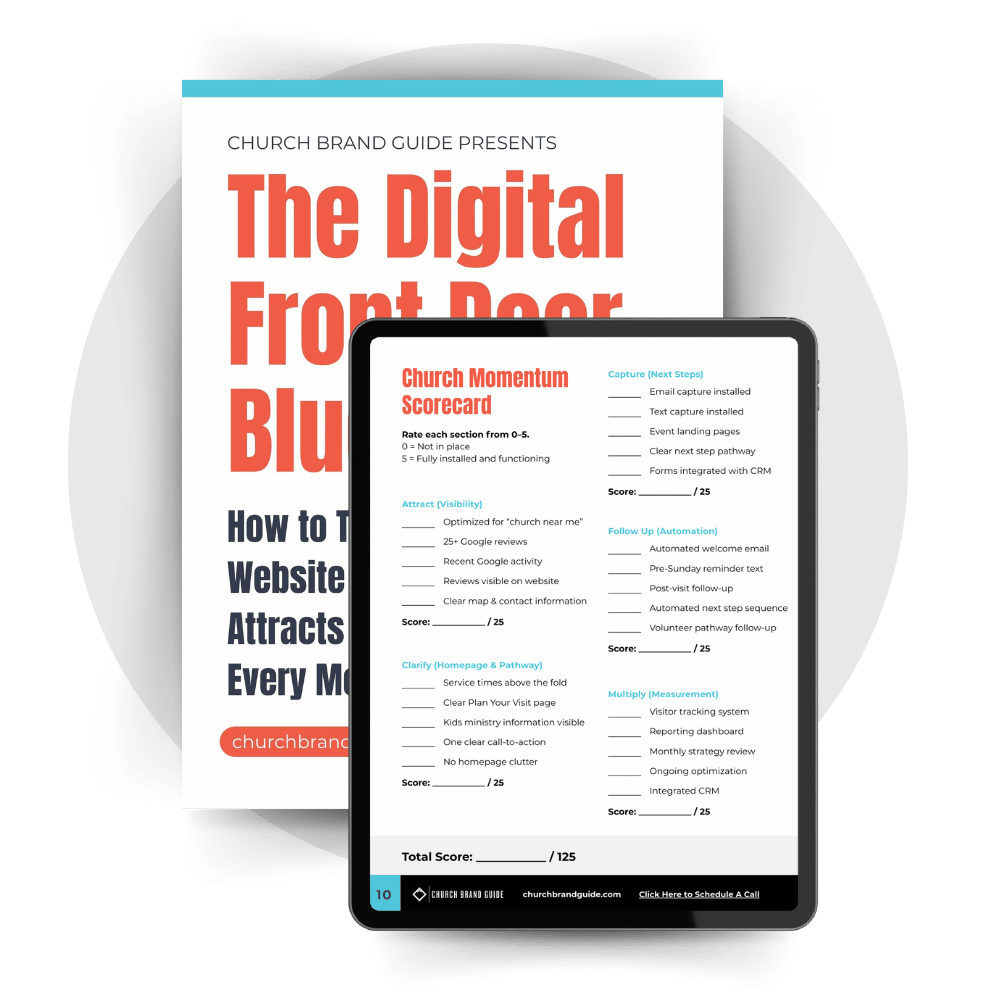
Is Your Church Website Building Momentum — Or Blocking It?
Before a young family ever walks into your church, they walk through your website.
If your digital front door is unclear, cluttered, or inactive, you could be losing visitors without realizing it.
The Digital Front Door Blueprint reveals the five systems growing churches use to turn their website into a clear, confidence-building pathway that attracts and retains young families consistently.
If you’re serious about growth, this is your starting point.
More Podcast Episodes
How to Use Email Marketing to Grow Your Church and Engage Your Community
In today's digital world, churches face a unique challenge: staying connected with their congregation while reaching new members. Email marketing offers a powerful solution, with 99% of users checking their email daily and religious organizations seeing an impressive...

How Google Reviews Help People Find Your Church (And Why You Need Them Now)
In today’s digital world, Google Reviews are essential for churches looking to connect with new members. Recent studies show that 97% of consumers use online search to find local organizations, including places of worship. For churches, these reviews serve as digital...
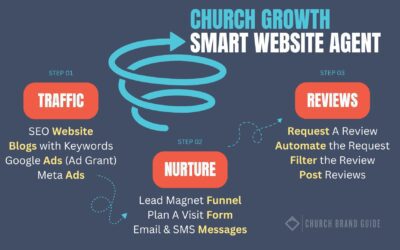
How a Smart Church Website Becomes Your #1 Tool for Growth in 2026
The way people find and connect with churches has changed dramatically. Today, 97% of people search online before visiting a local church, making your website the first impression most potential visitors will have. But having just any website isn't enough anymore. A...

How to Market Your Church in May: Reengage Visitors & Strengthen Your Core
May presents a perfect opportunity for churches to build on Easter's momentum and prepare for summer growth. With warmer weather and renewed spiritual interest, this month offers unique chances to connect with both visitors and long-time members. The weeks following...
Seasonal Church Marketing Strategy Leading Up to Easter
March Marketing Strategy Easter represents the biggest attendance opportunity of the year for churches. Research shows church attendance doubles on Easter Sunday compared to regular weeks, with an average increase of 102% according to LifeWay Research. Just as...
Church Logo Design Trends That Make You Stand Out
In this video, we explore the latest trends in modern church logo design that are shaping the visual identities of churches today. Discover how flat designs, bold fonts, and abstract symbolism are helping churches create simple yet powerful logos.